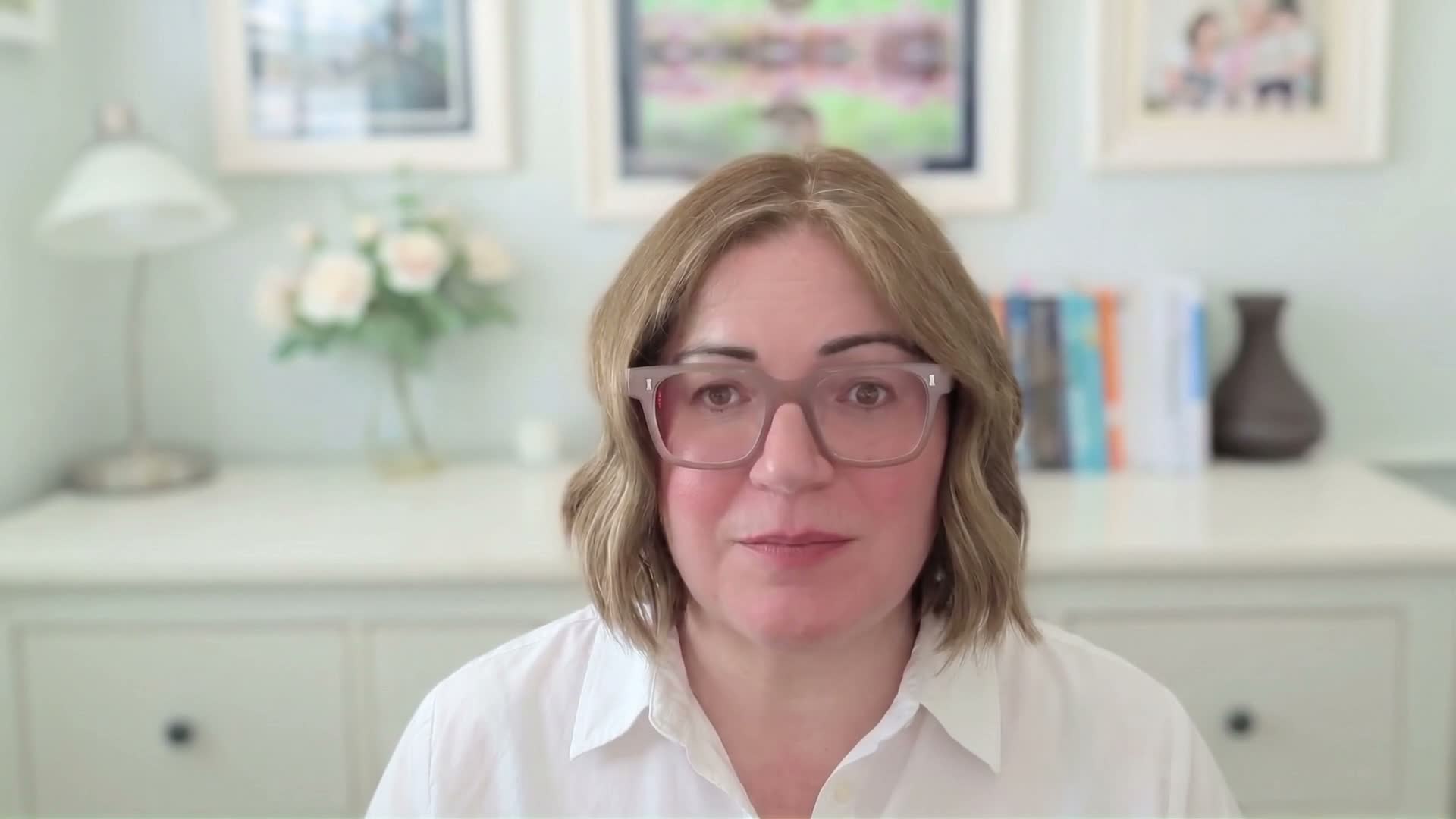
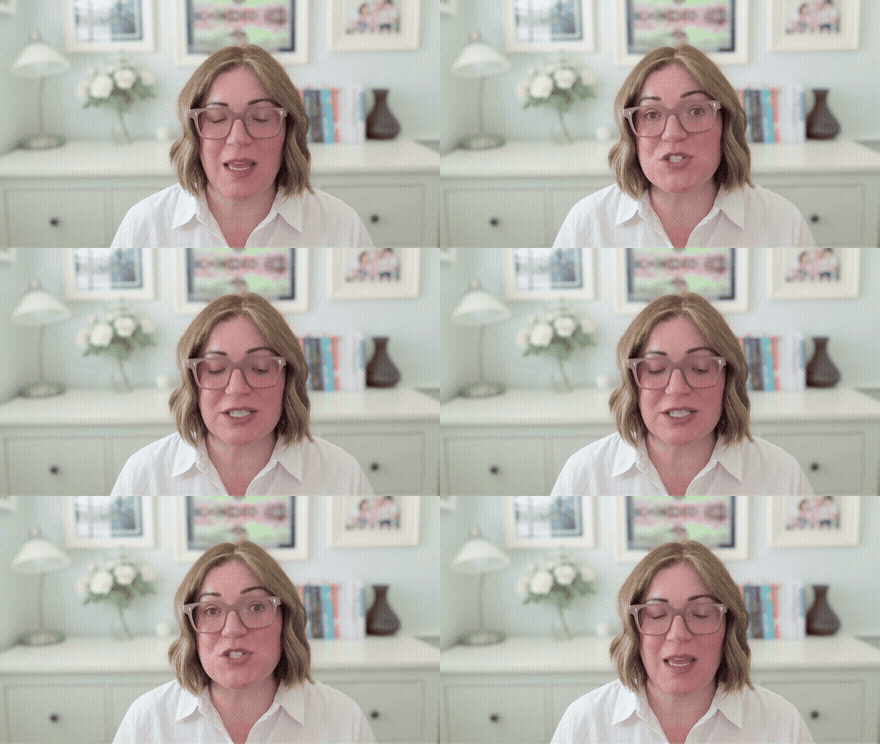
Julia's AI avatar, made with the method on this page.
Section 1 · The problem, and the promise
Why a personal video works.
Clients buy from people they can picture working with. A personal video gives them that: your face, their name, and a real person behind it.
What stops people is the making. For each prospect you write the script, pull their details together, record it, and try to get through without stumbling, and when you fluff a line you go again, and then there is the editing. Do that for every prospect and it is hours you do not have. Hand the writing over to AI to save some of that and it comes back smooth and generic, and clearly not you.
The promise is simple. You set up an AI version of yourself once, your face and your voice, and after that you never record again. For each new prospect the AI drafts the script in your tone of voice, you give it to your avatar, and a couple of minutes later the video is done, so it sounds like you every time without a blank page or a camera.
Section 2 · The insight that makes it a system
Most of it is the same every time.
One thing turns this from a writing chore into a system. Most of a good personal video is the same every time. Who you are, why you are worth trusting, and an invitation at the end. Only a part changes from one prospect to the next. Their name, their project, and a past job that looks like theirs.
Once you see that split, most of the video is already there. You just fill in the part that changes.
The fixed part you set up once. The changing part you drop in per prospect. That is what makes it repeatable, and it is why a few reusable prompts are all it takes.
Before you start
The script is the part that matters.
The video itself is made in HeyGen, a tool that turns a script into a short video of you, using an AI avatar that looks and sounds like you. It is genuinely good, and you can work straight in it. It will even help you write.
These steps matter because the part that makes or breaks a personal video is the script: sounding like you, staying honest, and saying the right thing to this person. If getting the words right is not your thing, the steps below do that heavy lifting and hand you a script ready to drop into HeyGen. They work in whatever AI you already use, Claude, ChatGPT, Perplexity or Copilot, and a free plan is enough.
If you would rather write and make the video in one place, without pasting between tools, that is the Project step at the end, where we show how to set it up in Claude or ChatGPT.
What you're building
The script, what you say
How you talkyour voice rules, set up once
+
The details for this prospectwho they are, and what you are proposing
a script that sounds like you saying it
Your avatar, how it looks and sounds
Your facefrom a short recording, set up once
+
Your voicemade in HeyGen, or ElevenLabs for a higher-quality voice
an avatar that looks and sounds like you
HeyGen brings them together
A personal video for this prospect: your words, your face, your voice
Step 1 of 5 · The differentiator
Capture how you talk.
This is the step that does the real work, so it is worth slowing down on. AI writing comes back generic because the tool was never told how you actually talk, the words you use and the ones you never would. So that is the first thing you do, and you only do it once.
Paste the prompt below along with something you have said or written, a transcript of a video, or a couple of client emails. It works out how you talk, plain or formal, the phrases you reach for, the fancy words you would never use, and hands you back a short set of rules. You reuse them every time, so every script is written in words you would actually say, not a generic voice.
Capture how you talkPaste into your AI tool, once
Prompt 1
Here is something I made in my own voice: [paste a transcript of a video you have recorded, or two emails you have sent a client].

Read it and describe how I actually talk. Give me back a short set of voice rules I can reuse: the phrases I reach for, how warm or formal I am, my sentence length, words I would never use, how I open and how I sign off. Keep it to one page, and write it as instructions you can follow, because I will give these rules to you every time you write something for me.
Why this works
This shapes the words, not the sound. It is what makes a script read like you would actually say it. The sound of your voice comes later, when you record it in HeyGen. You do this once and reuse the rules forever.
Step 2 of 5
Gather the context.
The hard part of a personal video is knowing what to say to this particular client. So before you write, get the tool to gather the context and hand you a short list to approve.
Keep the research and the writing as separate steps on purpose. Research is exactly where made-up or half-right facts creep in, so you confirm them here, before any of them reach the script.
A note. This step works best when your tool can search the web. Most paid AI plans do this by default.
Gather the contextPaste into your AI tool, fill the gaps each time
Prompt 2
Here is who I am proposing to: [prospect or company], for [the deal, proposal or project]. The people I will be speaking to are [names and roles, if I know them].

Research them from what is publicly available and tell me, in plain terms:
- What this prospect seems to care about most on something like this.
- Two or three angles for why we are a good fit for them specifically.
- A fact or two I could mention to show I have done my homework, only if they are real.

Mark anything you are not sure of as "check this", because I will only use facts I can confirm. Do not state something as certain if you found it only once or worked it out by guessing.
Why this works
This turns twenty minutes of digging into a short list you approve. Because it separates what was found from what is confirmed, it keeps the video honest. What you confirm here becomes the per-deal facts you paste into the next step.
Step 3 of 5
Write the script.
Now the script. Paste the prompt below, fill in the gaps for the prospect you are working on, and it writes the whole thing in your voice, using the rules you captured in step one.
The important part is the rule sitting inside the prompt. It is told to use only real facts, and to leave a line out rather than invent one. A made-up "we worked with a client just like you" is both untrue and the kind of thing a prospect can check in seconds, so the prompt is built never to reach for it.
Write the scriptPaste into your AI tool, fill the gaps each time
Prompt 3
You are writing a short, warm, spoken-word script for a personal video from me to a prospect, sent when I am trying to win their business. The goal is to put a human face behind the sale. First person, conversational, British English, 45 to 75 seconds read aloud (about 130 to 190 words). Sound like me talking, not a letter. Output the script only. Follow the voice rules I gave you.

Rules (important):
- Use ONLY the facts I give you below. Never invent a client, a result, a relationship or a number. If something is missing, leave it out rather than guess.

Per-prospect inputs (fill in each time):
WHO IT IS FOR: [names to greet, and their company]
WHAT I AM OFFERING: [the deal, proposal or project, plus one thing I know about it]
A RELEVANT PROOF POINT: [a real client or result that fits what they need, only if I have one]
THE NEXT STEP I WANT: [a call, a meeting, a visit]

My voice rules: [paste the voice rules from step 1]

Structure to follow:
1. Greet them by name and introduce myself.
2. Name what I am offering and the one thing I know about it.
3. Give one relevant proof point, only if it is real.
4. One credibility line about why people trust us.
5. A clear, warm invitation or next step.
6. A warm sign-off.

Keep it natural. Do not force any part I have not given you.
Why this works
The script is 90% written before you type a word, and the rule against inventing facts keeps it honest.
Step 4 of 5
Turn it into a video.
The last step turns your script into a video. Before your first one, you set up your avatar in HeyGen. It takes a few minutes, and you only do it once.
Setting up your avatar
Create a HeyGen account. To send a client a real video you need a paid HeyGen plan (their Creator plan is the usual starting point), or you can pay per video through their API. The free tier is for trying it out only, it watermarks videos and caps the quality and length.
Record a short clip of yourself, following the prompts on screen. HeyGen builds your avatar from this clip, and the same clip is your consent that it really is you.
Set up your voice. This is the part worth spending real time on.
Your voice recording is what makes it sound like you
This is a different voice from step one. There you set how you write, here you set how you actually sound. The picture takes care of itself. The voice recording decides whether this feels like you or like a machine, so give it real time. Expect a few goes, not one. Record somewhere quiet, use a proper microphone rather than your laptop, speak naturally, and compare a couple of versions before you settle. HeyGen's own guidance is that a good voice takes more than a quick voice memo.
For the most natural result, you can bring your own ElevenLabs voice into HeyGen. You clone your voice in ElevenLabs, then paste your ElevenLabs key into HeyGen so it shows up as one of your voices. It needs an ElevenLabs account with credits, and it is the route HeyGen itself recommends when you want the best quality.
Make the movement feel natural
Two things stop the video looking stiff. First, the avatar itself. HeyGen offers different avatar qualities, and one trained on real footage of you moves far more naturally than one built from a single photo. So record proper footage, and use a good-quality avatar for your final version rather than the quick draft one.
Second, how it moves. You can guide how animated you come across with a short description of the manner you want, for example calm and settled, speaking to one person, or warm and a little more lively. Describe what you do want, never what to avoid, because these tools tend to do the opposite of a "don't". Telling it "no hand gestures" reliably produces more of them. Expect a couple of goes to get it right.
Your avatar and voice are then saved, and you reuse them for every video you make.
You are not stuck with what you wore or where you filmed. HeyGen can change your outfit and your background from the same recording, so one clip gives you a smart look for a formal approach or a relaxed one, in your office or against a clean backdrop, whatever suits the client.
You own the avatar
You record the consent clip once. The avatar built from it is yours, and you reuse it for every video after. Because a clip from you is required, no one can build one of your likeness without you.
Once your avatar is ready, paste your finished script into HeyGen and render. That is your video made.
Check a cheap draft first
Render a quick, cheaper test first, at a lower quality or using HeyGen's faster mode, before you commit to the final one. Watch it back and check the words, the pace, and how it says names and any unusual terms. If the avatar trips on a name, spell it in the script the way it sounds. Then render the good one. It saves time and money.
Step 5 of 5
Send it.
You have a video. The last step is getting it in front of the client, and doing it in a way that keeps their trust.
Download the video from your tool. A short one like this is usually small enough to attach to an email, and the person you send it to will normally download it to watch, which is fine. Dropping it at the top of a proposal works just as well.
For one click and it plays, send a link instead. Where the link points is up to you:
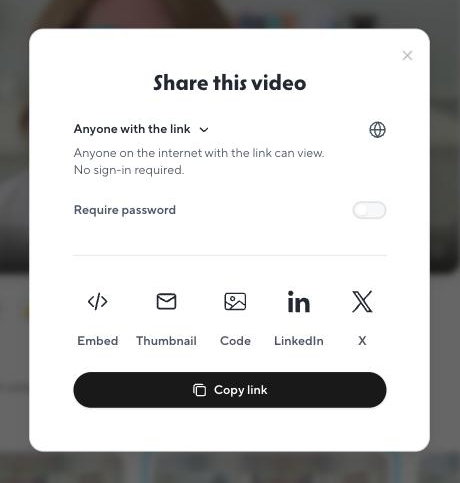
The tool's own share link is the easiest. In HeyGen, Share gives you the link, and you can switch on a password for sensitive videos. The video plays on HeyGen's page, so the client can see the tool you used.
Your own file storage. OneDrive, SharePoint, Google Drive or Dropbox, shared with the named people only. Keeps a sensitive video private, and shows no tool at all.
A video site like Vimeo or an unlisted YouTube link, for a clean player without the tool's name on it. HeyGen can send your video straight to Vimeo.
A page of your own. The most polished option: the video on your own website, with your branding around it, locked so only the client you sent it to can open it, and stats on who watched. This one is more advanced, and it is the kind of thing we build. Come and talk to us.
serpin.ai/a-note-for-james
SERPIN
A personal note from me
Thanks for making the time to talk yesterday.
▶
🔒 A private page, just for you
A page of your own: your branding, one client, and you can see who watched.
Whichever you choose, add a line of your own above the link so it is not a bare link in an email.
A nice touch either way: put a picture from the video in the email and link it to the video. Email programs will not play a video inside the message itself, but an image that opens it in one click feels close. A simple still works, or a short moving preview if your tool makes one. Either way, choose a moment where you look good.
To: James Whitfield Subject: A short note before Thursday
Hi James, rather than another long email, here is a one minute note from me.
▶ Watch the full video (1 min)
A picture from the video, in the email, linked to the full thing. This one is a moving preview.
HeyGen will make the picture for you: under Share, choose Thumbnail and you get a moving preview ready to drop into an email, already linked to your video on HeyGen's page. If you would rather the link went somewhere of your own, take a still from the video yourself and link it to wherever your video lives.
Everything in one place on HeyGen's Share dialog: the link, a password switch for sensitive videos, and Thumbnail for the moving preview.
Saying it is an AI avatar is your call
Some people add a short line telling the client the video is their AI avatar, and find it builds trust. Others do not mention it. It is up to you. Either way, they are your own words and your own face, just made this way.
Optional: you can add a short title card with your name or company at the front. Most videos do not need one.
What you have when you're done
What this looks like in practice.
Whenever you are reaching out to win someone over, sending a proposal, replying to an invitation to bid, an outbound introduction, or putting a product in front of them, they get a personal note from you, by name, instead of a plain email. It sounds like you, every fact in it is real, and it costs you a few minutes.
Going further
Make it repeatable.
The first video took real effort: you worked out your writing voice, your rules, what a good one sounds like. A Project keeps all of that, so the next video is a single message: "this one is for James at Acme, here is what has changed since we met." Effort once, then every video after takes minutes. That is the whole point of this step.
You can happily stay with the prompts above and never do this part. But if you find yourself making these regularly, set it up once. A Project is a saved workspace that remembers your instructions, so every chat inside it already knows how you want your videos written. Both Claude and ChatGPT have them, so you make yours in whichever you already use. The steps are the same either way, and we show the one place they differ when you get there.
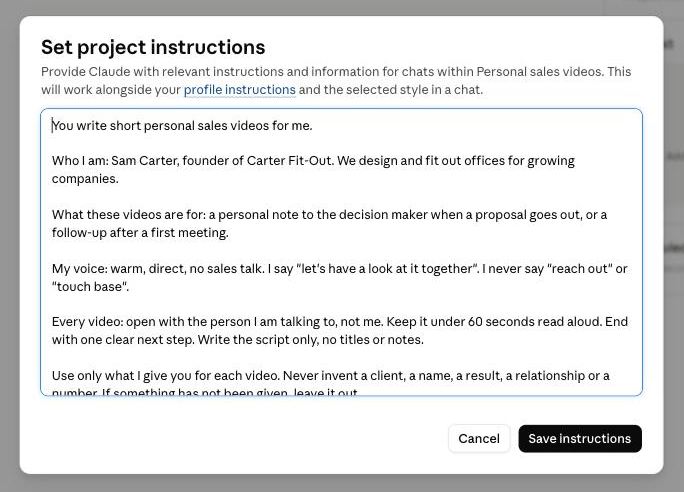
What yours will look like: your voice, your rules and your structure, saved once in the Project's instructions.
1. Write your Project's instructions, once
Paste this into a new Claude or ChatGPT chat. It asks you a few questions, then writes the reusable instructions for your Project. No client names yet, those come when you make an actual video.
Set up your ProjectPaste into a new Claude or ChatGPT chat, once
Project prompt
You are helping me set up a Project in Claude (or ChatGPT) that will write short personal sales videos for me, so I never start one from a blank page.

Keep this simple, warm and plain. Use everyday words, skip the jargon, and do not teach me how it works. Write in plain sentences, with no dashes. Your job is to ask me a few questions, then write one thing for me: the instructions for my Project. That is all we are doing here.

Important: we are only setting up the reusable part now, which is how I want my videos written in general. Do not ask me for any specific client, deal, name or example yet. Those come later, when I actually make a video. If I start giving you specifics now, gently tell me to save them for when we make the first one.

Ask me these, one or two at a time, in a warm and natural way. Work things out from my answers and check back with me, rather than interrogating me. Adapt the wording to how I answer.

1. Me and my business: my name, my role, and in a line or two, what I sell or do, and who for.
2. What these videos are for in my sales: for example introducing myself when a proposal goes out, opening a sales conversation, or following up after a first meeting. Let me describe it in my own words.
3. What a good one should include: what I want in the video, how it should feel, and anything it should always do or never do.
4. My voice: how I come across at my best, a phrase I actually use, and anything I would never say.
5. Why me: in general terms, what I want people to feel they can trust about me. My positioning, not named clients.

Once you have enough, propose a simple structure for my videos in plain words, based on what I told you, and check it with me before you write anything. Keep to a few good principles: open with the person I am talking to rather than myself, keep it short and human, and end with one clear next step. Do not force a structure that does not fit what I said.

Then write ONE block for me, clearly labelled, in its own copy box:

MY PROJECT INSTRUCTIONS (paste this into the Project's Instructions box).
Write it as directions to the Project, in the second person ("You write short personal sales videos for me..."). Include: who I am and who I sell to; what these videos are for; my voice, written as simple always and never rules; how each video should be written (first person as me, warm and spoken not written, British English, 45 to 75 seconds read aloud, output the script only, no titles or notes); the structure we agreed; and this rule in full: "Use only what I give you for each video. Never invent a client, a name, a result, a relationship or a number. If something has not been given, leave it out."
End the instructions with this line: "Each time, I will tell you who this video is for and give you the details for that one. Ask me for anything you need, and never make any of it up."

After the block, tell me in one line to paste it into my Project's Instructions box. Then point me to the next step, connecting HeyGen so my Project can turn a script into a video.
2. Create the Project and paste them in
In Claude or ChatGPT, open Projects, create a new one, name it something like "Sales videos", and paste the instructions into its Instructions box. This is the same in both.
3. Connect your video tool so it renders in the chat
You already set up your avatar above. Now connect HeyGen to your Project so it can turn a script into a video without you leaving the chat. This is the one part that differs by tool.
Showing steps for:
Connect HeyGen in Claude
Go to Settings, then Connectors, and add a custom connector. Paste in the address https://mcp.heygen.com/mcp/v1/, name it HeyGen, and sign in to your HeyGen account. Use the one named HeyGen, not the one called Hyperframes, which is a different tool.
Connect HeyGen in ChatGPT
Open the Apps or Plugins area, search for the official HeyGen app, and add it. Sign in with your HeyGen account. Once it is connected, your Project can turn a script into a video.
4. Now every video is one message
Open a new chat in your Project and give it the details for this one: who the prospect is, what you are proposing, and anything real worth a mention. For example: "This is for Sarah Ellis, operations director at Meridian. We are proposing to run their customer onboarding, and we worked with a similar firm last year. Write the script and make the video with my avatar." It writes it in your voice, asks if it needs anything more, you check it, and it renders. You download the finished file from HeyGen.
Why this works
The setup lives in the Project, so you do it once. Every future video starts from a workspace that already knows how you write, and all you add are the details for this one.
The ladder
Where this can go next.
You have made one, and set up a Project to do it again. From here it can go further, and this is the part we build with you.
A video page of your own. Instead of a shared file, the video sits on your own website: your brand around it, locked so only the client you sent it to can open it, and you can see who watched and for how long. This is what the video-selling tools charge a monthly subscription for. Built once, it is yours. You are looking at an example right now: the video at the top of this page is ours, on our own page.
A packaged skill. The whole process becomes a reusable skill that runs the same way every time, with even less prompting, so anyone on your team can use it.
Built into your work. It connects to your CRM and your other systems, so when a deal reaches the right point in your process, a lead you have qualified, a tender you have agreed to take on, or a proposal going out, the details are already there and a personalised video is drafted for you to check. It can run across the whole team.
What does this look like in your business?
On a short call we can work out which of these fits, and what it takes to get there.